See what your experts' knowledge can become
Get a free demo. A 15-minute chat, fully tailored
to your needs. No commitment.

Updated on
eLearning localization is the process of adapting online training, including its language, examples, images, regulations and cultural references, so it works for learners in each country or region. eLearning translation is one part of that process: converting course content from one language into another.
As organizations grow across borders, localization is essential. A course that works brilliantly in English can confuse, or even mislead, employees who learn better in another language or work under different local rules.
The good news is that localizing training no longer has to mean months of back-and-forth with translation agencies. With AI translation and a clear workflow for local experts, L&D teams can deliver training in multiple languages in days, not months.
In this guide, we cover the difference between eLearning localization and translation, the main ways to approach eLearning language translation, and a simple 4-step process to localize your courses.
Key takeaways
eLearning localization adapts your company’s learning and development courses, materials, and reporting to fit your team’s diverse languages and cultures. Done well, it provides the same quality of training courses and information to all staff, no matter what country or language they operate in.
Localization goes beyond simply translating the words in a specific course. Where appropriate, it also adjusts the images, videos, tone of voice, currencies, and other crucial elements that help training make sense for each learner.
eLearning translation is the process of converting a course's text, audio and video from one language into another, so learners can take it in their own language. It focuses on linguistic accuracy: the translated course should mean exactly what the original means.
In most cases, localization produces better learning outcomes. But translation is often the right starting point, especially when AI can handle it in minutes and local experts can then adapt what matters most.
When teams plan eLearning localization, they often think only about course text. But learners experience everything around it too. Here's what to include in your scope:
There are countless benefits to localizing courses. Most notably, everyone can learn and understand important concepts in their native language.
But here are a few good benefits you may not have considered.
While you want employees to take initiative and apply lessons to their everyday work, too much interpretation can be an issue. Especially for technical or legal subjects, you want every learner to understand and take away precise lessons and rules of thumb.
When learning isn’t localized, employees are asked to bridge the gap between their native language and that of the lessons. While they might easily understand 85% of the material (for instance), they may make false equivalencies between terms.
Pinpoint localization takes the guesswork away for team members, and ensures everyone takes the same conclusions from training sessions.
Learning is always influenced by context. A good L&D program will deliver courses in the right formats and at the appropriate times to best reach learners. But the material itself also needs to meet its audience’s specific context.
Local context changes over time, too. Payment methods, workplace tools and communication habits differ from country to country. A course that assumes everyone pays by card, or uses the same messaging apps, can feel out of touch in markets where people do things differently.
Localization lets your authors adapt examples and tasks to match local audiences. Simple examples include:
As we’ll see, localizing learning content can easily be done in house with your existing subject-matter experts. It doesn’t have to take huge amounts of time, and you don’t need an external translation service or L&D consultants in each language.
The common alternative is purchasing whole content libraries or training courses in each language. And those costs can quickly add up.
55% of HR professionals say that training is the most important investment they can make in employee experience. And 26% believe that a lack of learning opportunities is the number one cause of employee turnover.
Learning programs keep employees happy and high performing for longer. But only if they’re easily accessible and engaging to everyone.
Localizing courses is a necessary step to ensure that they nurture and develop your whole team—not just the employees at head office.
Suppose you require anti-money laundering training for your whole workforce. The broad messages and best practices will be the same across the board, but the specific regulations and response steps may differ from country to country. So too will the precise language you use to refer to “politically-exposed people” or the “Money Laundering Reporting Officer” in your company.
Localization lets you build the overall course to suit everyone, then insert the precise legal terminology you need in each jurisdiction. And translate the course into each language, obviously.
There are three main ways to translate eLearning content. Each has a place, but they differ a lot in speed, cost and how well the result fits your organization.
Agencies are reliable but slow and expensive, and every course update starts the process again. AI alone is fast, but it doesn't know your products, your internal vocabulary, or how a policy applies in a specific country.
Combining the two gives you the best of both. AI does the heavy lifting in minutes. Then local subject-matter experts, the people who know both the topic and the region, review the translation and adapt examples, terms and regulations where needed.
Because these experts are already inside your organization, localization becomes part of how your teams share knowledge, not a separate project with an outside vendor.
Localizing your corporate learning and development is largely a matter of tooling. With the right LMS or LXP software in place, localization is relatively fast and straightforward.
Which means you need to choose the right learning software. We’ll see what localization should look like next. But first, there are two deal-breaker questions to ask a prospective provider.
The obvious first question to ask of your LMS platform is: how many languages does it support? If your platform of choice can easily localize content into every language you need, that’s what matters.
But we can go further, and there are a few extra considerations:
As a benchmark, 360Learning supports more than 60 languages, and that number will only keep growing.
Obviously you want to localize specific training material. Localization happens at many different levels within an LMS platform.
Does your LMS or eLearning platform make it easy to translate courses, and for users to switch between languages?
Here are some of the sections of an LMS that can be localized:
Are you an existing 360Learning user and want to localize a language path? Follow the step-by-step instructions.
Here's how the process works for a course or a full learning path in 360Learning. (Existing customers can follow the step-by-step instructions in our support center.)
An admin or author adds the language they need to a course or learning path. Nothing changes for learners yet, so translators can work in private. For a learning path, make sure the courses and certificates inside it are translated too.
Assign translators for each language, such as local experts who know both the topic and the region. They receive an email with a direct link to the translation interface, and you can send reminders. Translators can update the contents, but can't change the structure of the path or the original content.
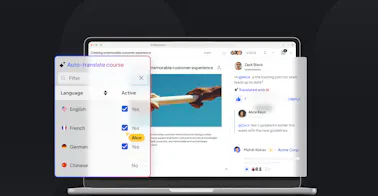
Translate the course with AI in one click, translate it manually, or import translation files. Then local experts review the result and adapt text, images, videos and links for their audience. With the language manager, you can manage every language for a course, path, skill or SCORM file in one place.
Publish the new language. Learners automatically see content in their chosen language if it's available, or the default language if not, and they can switch languages at any time, including on mobile.
A few habits make localization faster, cheaper and more accurate, whichever approach you choose:
There’s obviously a labor burden to localizing courses at scale. In the past, L&D teams were hesitant to commit the time and energy required to do so. And you had to beg subject-matter experts from other teams to lend their expertise.
But the lift is now so much lighter. AI translations are built into 360Learning's AI Content Builder. In a single click, you can translate a module, its captions, or an entire course into 60+ languages, with contextual, natural translations that local experts can then review and refine.
This lets you:
Across our customers, teams using 360Learning for multilingual training cut translation costs by 30% on average, by replacing weeks of back-and-forth with translators with AI translation and in-house review.
Here’s a short demo of these incredible, instant AI translations in action:
eLearning localization used to mean choosing between speed, cost and quality. Today, the right multilingual LMS lets you have all three: AI translation for speed, local experts for context, and one place to manage every language as your courses evolve.
With 360Learning, global L&D teams can:
Most importantly, translating is fast, easy, and supercharged by AI tools. Which takes so much of the stress and hassle from your local leaders and subject-matter experts.
There are no bottlenecks, just smart solutions for global teams.
Get a free demo. A 15-minute chat, fully tailored
to your needs. No commitment.
By providing your contact info, you agree to receive communications from 360Learning. You can opt-out at any time. For details, refer to our Privacy Policy.
How much does eLearning translation cost?
Can AI translate eLearning courses accurately?
How do you translate SCORM courses?
How long does eLearning localization take?
Which languages should you localize first?
 Our weekly newsletter of the best insights from L&D peer to L&D peer.
By providing your contact info, you agree to receive communications from 360Learning. You can opt-out at any time. For details, refer to our Privacy Policy.